
Phone Not Ringing on Incoming Calls: Causes and Safe Fixes
Direct answer: if your phone shows incoming calls but never makes a sound, the cause is almost always a setting — silent mode, Do Not Disturb, low ringer volume, Bluetooth routing, or call forwarding — not a broken speaker. Work through the five-minute checks below in order, test with a real call, and only consider hardware diagnosis after every setting is ruled out.
On this page
Direct answer: if your phone shows incoming calls but never makes a sound, the cause is almost always a setting — silent mode, Do Not Disturb, low ringer volume, Bluetooth routing, or call forwarding — not a broken speaker.

1. Who this guide helps
This guide is for anyone whose iPhone, Samsung Galaxy, or other Android phone vibrates or lights up on incoming calls but does not ring — or does nothing at all when someone calls. It is useful whether the problem started suddenly, after an update, or has been getting worse over time. (Source: support.apple.com)
It is not the same as an alarm problem. If your morning alarm does not sound, that involves different settings (ringtones under the Clock app, attention-aware features, sleep schedules). For that, see our companion guide on iPhone alarm not working — causes and safe fixes. If your phone rings but the sound is distorted, buzzy, or crackly, see our phone speaker crackling fixes instead.
Quick fact: a phone that vibrates on incoming calls but stays silent is telling you the speaker itself probably works — the ringer signal is being rerouted or suppressed by a setting. Total silence plus no vibration is the scenario that points more strongly toward a hardware issue.
2. The five-minute checklist: do these first
Before changing anything in Settings, run this fast sequence. Most “not ringing” problems are solved in step one or two.
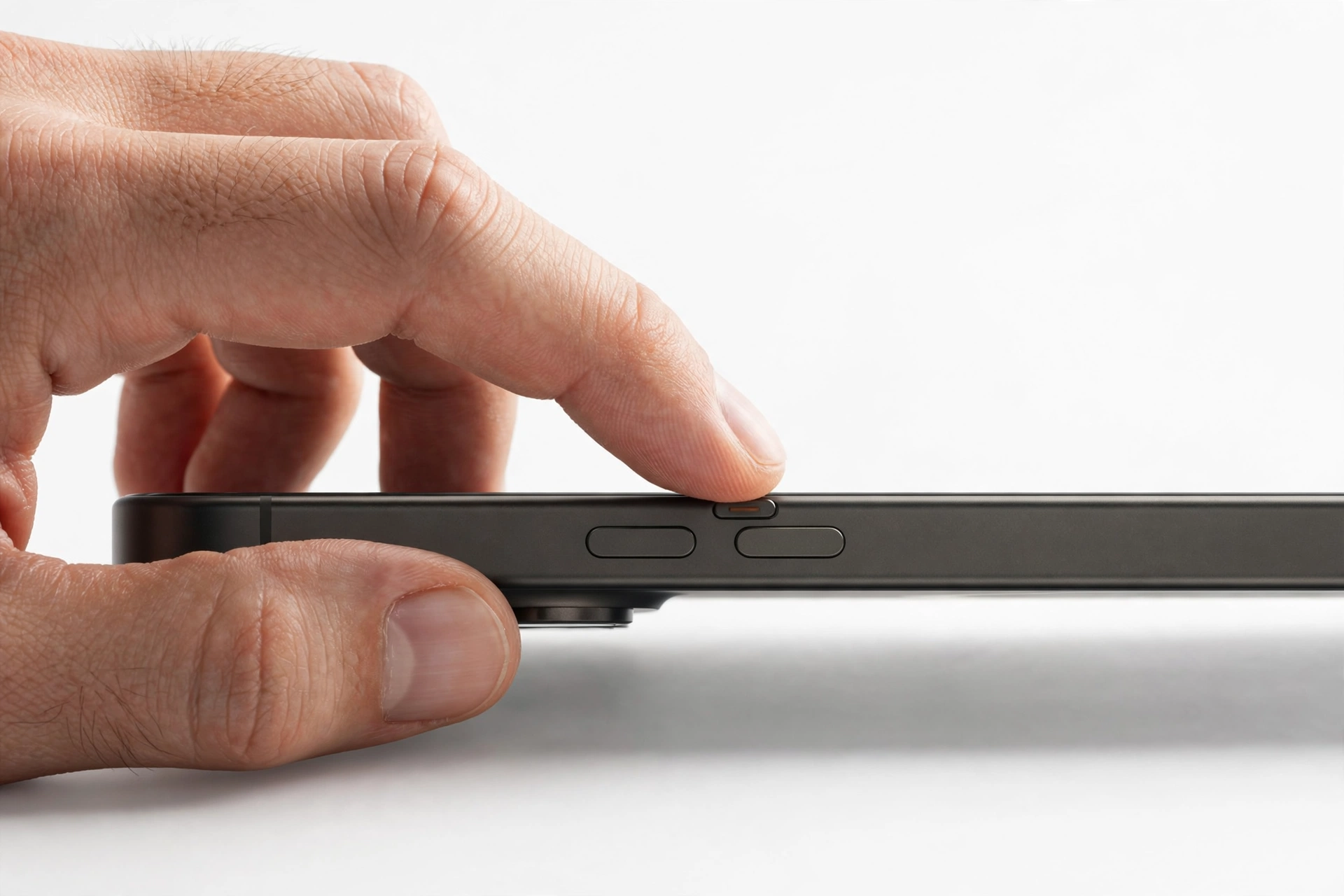
- Look at the physical mute control. On an iPhone, find the Ring/Silent switch on the left edge (or the Action button on newer models). If the switch shows orange, the phone is on Silent — push it toward the screen to turn the ringer back on. On Samsung and other Android phones, press the volume-up key and check the on-screen panel: make sure the profile says Sound/Ring, not Vibrate or Mute.
- Check for a moon icon. Swipe into Control Center (iPhone: top-right corner; Android: swipe down twice). If you see a moon icon or a highlighted Focus/Do Not Disturb tile, tap it to turn it off.
- Turn Bluetooth off temporarily. A connected earbud, car system, or speaker can “steal” the ringtone — the phone rings on the accessory, not on its own speaker. Toggle Bluetooth off and call the phone again.
- Raise the ringer volume with the slider, not just the buttons. Go to Settings > Sounds and make sure the ringer/ringtone slider is well above zero. Volume buttons sometimes control media volume only, not the ringer.
- Call the phone from a second device. This is the only reliable test. Watch whether the screen lights up, whether it vibrates, and whether any sound comes out.
If the phone rang normally after any of these steps, you are done — no repair needed. If it still stays silent, continue through the detailed sections.
3. The iPhone Ring/Silent switch and Action button
The simplest cause on iPhone is also the most common: the phone is on Silent. On iPhones with a physical switch, orange showing next to the switch means Silent is on. Push the switch toward the screen until no orange shows. On newer iPhones with an Action button instead of a switch, check Control Center for the bell icon — a bell with a line through it means Silent is on.
Silent mode still lets the phone vibrate (if vibration is enabled), so a vibrating-but-silent phone with an orange switch is a fully healthy phone that is just muted. You can also choose whether the phone vibrates on silent under Settings > Sounds & Haptics. If you never want to miss calls, leave Ringer and Alerts volume turned up and consider turning on “Vibrate on Silent” as a backup alert. For vibration-specific problems, see phone vibration not working — fixes.
4. Ringer volume versus media volume
Phones have two separate volume systems: the ringer/alerts volume and the media volume. Turning up the volume while watching a video changes only the media volume — the ringtone can still be at zero.
How to set the ringer volume correctly
- iPhone: Settings > Sounds & Haptics, then drag the Ringtone and Alerts slider toward the right. Optionally turn on “Change with Buttons” so the side volume keys also adjust the ringer.
- Samsung: Settings > Sounds and Vibration > Volume, then make sure the Ringtone slider is raised.
Tip: test the ringer by tapping a ringtone name in Settings — the phone should play a preview. If the preview plays but incoming calls stay silent, the speaker works and the problem is a suppression setting (Focus, forwarding, blocking) rather than audio hardware.
5. Do Not Disturb and Focus modes
This is the single most common reason a phone shows missed calls without ever ringing. Do Not Disturb (and iPhone Focus modes like Sleep, Work, Driving, or Personal) silence calls while still logging them — which is exactly why you see the missed-call entry but never heard a ring.
Why it catches people off guard
- A Focus can turn on automatically by schedule, location, or on-device intelligence — you may never have switched it on manually.
- An iOS or One UI update can reset or add Focus/Mode settings you did not choose.
- Samsung’s Modes and Routines (Theatre, Sleep, Driving) can enable Do Not Disturb for your convenience — and a Routine can also lower the ringtone volume to zero at certain times or places.
How to check and fix it
- iPhone: Open Control Center and look at the Focus tile (top-right area, near the battery icon). If a moon icon or a named Focus is highlighted, tap it to turn it off. Then go to Settings > Focus and open each profile (Do Not Disturb, Personal, Work, Sleep). Turn off any active profile and check its schedule and Smart Activation so it does not switch itself back on.
- Samsung: Swipe down twice for Quick Settings and make sure Do not disturb is off. Then go to Settings > Notifications > Do not disturb for schedules. Also check Settings > Modes and Routines — disable the Do not disturb condition on any mode you use, and delete or edit any Routine that enables DND or drops speaker volume to 0%.
Stop for safety: if you rely on silent mode for work or rest, do not just disable everything permanently — instead, use the “allow calls from” options below. The goal is that wanted calls ring, not that the phone makes noise all day.
Letting important calls through while keeping quiet
You do not have to abandon Focus/Do Not Disturb entirely. Both platforms let you whitelist callers:
- iPhone: Settings > Focus > [your Focus] > People > Allow Calls From — choose Everyone, Contacts Only, Favorites, or Allowed People. Turn on Allow Repeated Calls so a second call from the same person within three minutes always rings through.
- Samsung: Settings > Notifications > Do not disturb > Calls, messages and conversations, and set which contacts may bypass DND.
6. Silence Unknown Callers and blocked numbers
If only some callers fail to ring — unknown numbers go straight to silence while contacts ring normally — the cause is a call-filtering feature, not a fault.
- iPhone: Settings > Apps > Phone (or Settings > Phone on older iOS) > Silence Unknown Callers. When on, calls from numbers not in your contacts, recent calls, or Siri Suggestions are silenced. Turn it off and test.
- Samsung: Open the Phone app > three-dot menu > Settings > Block numbers > turn off Block calls from unknown numbers. Also check whether the specific caller’s number is on the block list.
- Carrier spam filters: Some carriers add their own spam-blocking that silences suspicious calls before your phone ever sees them. If one person always fails to ring, ask them to confirm their number is not flagged, and check your carrier’s call-filter app settings.
Hypothetical example: Maya runs a small delivery business in Las Vegas and misses callbacks from new customers. Her iPhone rings for saved contacts but never for new numbers. She finds Silence Unknown Callers turned on after an update, switches it off, and the next customer’s call rings normally. (Hypothetical illustration, not a customer story.)
7. Bluetooth and audio routing: the stolen ringtone
When your phone is connected to Bluetooth earbuds, a car system, a smartwatch, or a portable speaker, the incoming-call ringtone may play on that accessory instead of the phone’s speaker — or be suppressed entirely. This is working-as-designed audio routing, not a defect.
How to test
- Turn Bluetooth completely off (not just disconnect one device — toggle it off in Settings or the Quick Settings/Control Center).
- Call the phone from another device. If it rings normally now, a Bluetooth accessory was the cause.
- Reconnect devices one at a time to find the culprit. Common offenders: earbuds left in a bag that are still connected, a car system the phone paired with hours ago, or a smart speaker.
Tip: on Samsung, Samsung’s community guidance also notes that if headphones are connected, the volume keys adjust the headphone volume instead of the phone’s ringer — disconnect them before judging the ringer volume. Also check Settings > Accessibility > Hearing enhancements > Mute all sounds and make sure it is off.
Also check the headphone jack or USB-C port area: if the phone thinks wired earphones are still plugged in (lint or moisture can do this), it may route call audio away from the speaker.
8. Call forwarding: calls that never reach the phone
Call forwarding sends incoming calls to voicemail or another number before your phone ever rings. The phone looks completely normal — full signal, no silent mode — but it never rings because the call is diverted upstream.
- iPhone: Settings > Apps > Phone > Call Forwarding — make sure it is off (it shows a small phone-with-arrow icon in the status bar when active).
- Samsung: Phone app > three-dot menu > Settings > Supplementary services or Call forwarding — set all options to Off.
- Carrier-level forwarding: Your carrier can also forward calls at the network level (for example, “forward when unreachable”). If the phone’s own settings show forwarding off but calls still never ring, contact your carrier and ask them to check and clear any network-side forwarding.
9. Airplane mode and network problems
Airplane mode blocks all calls — the phone will not ring at all and callers may go straight to voicemail. Check Quick Settings/Control Center and make sure the airplane icon is off. On some phones, Airplane mode can remain partially active after a reboot or an automation runs, so verify in Settings > Connections (Samsung) or Settings (iPhone) rather than trusting memory.
If the signal bars are missing or very weak, the phone may not receive the call in time to ring. Move to a different location or step outside, toggle mobile data off and on, and confirm the phone is registered on the network before retesting.
10. Custom ringtone problems
A custom ringtone that was deleted, moved, or corrupted can leave the phone with no sound to play. The fix is simple: switch back to a built-in tone.
- iPhone: Settings > Sounds & Haptics > Ringtone. Make sure a tone is selected — not “None”. Tap a default tone such as Reflection or Opening to preview it. If a custom tone no longer plays, it may have been removed during an update.
- Samsung: Settings > Sounds and Vibration > Ringtone. Pick a built-in ringtone and tap it to hear the preview.
Also check per-contact ringtones: a specific contact can have their own ringtone (or none). If only one person never rings audibly, open their contact card and check their assigned ringtone and vibration.
11. Software fixes: restart and update
A stuck audio process can suppress the ringer even when every setting looks correct. These steps clear it safely.
- Restart the phone. Hold the side button (plus volume on newer iPhones) and slide to power off, wait about 15 seconds, then turn it back on. On Samsung, use the power menu > Restart. Then test with a real call.
- Update the software. Go to Settings > General > Software Update (iPhone) or Settings > Software update (Samsung) and install any pending update. Audio-routing bugs are a common fix in point updates.
- Reset settings without erasing data (last resort). On iPhone: Settings > General > Transfer or Reset iPhone > Reset > Reset All Settings — this resets preferences (including sound settings) without deleting your data. On Samsung: Settings > General management > Reset > Reset all settings.
Do not use “Erase All Content and Settings” or a factory reset as a casual troubleshooting step for a ringing problem — it deletes your data. A settings reset is enough for sound issues. Back up before any reset anyway.
12. Android Safe Mode test
On Samsung and other Android phones, a third-party app (call blockers, automation apps, custom launchers) can intercept or silence incoming calls. Safe Mode temporarily disables all third-party apps so you can test cleanly.
- Press and hold the power button until the power menu appears.
- Press and hold the “Power off” icon until the Safe mode prompt appears, then tap it.
- Call the phone. If it rings in Safe Mode, a third-party app is the culprit — uninstall recently installed or updated apps one at a time, starting with call blockers and automation tools.
- Restart normally to leave Safe Mode.
13. When the speaker itself is the problem
Hardware failure is genuinely rare for this symptom, but here is how to check. Play a ringtone preview in Settings (step 4 above). Then play music or a video at full volume.
- Preview plays but calls stay silent: the speaker works. Go back to settings (Focus, forwarding, blocking).
- Nothing makes any sound at all — no ringtone preview, no music, no video audio: the speaker may be damaged, blocked by debris, or affected by liquid. Check the speaker grille for lint and follow our speaker crackling and muffled sound guide for safe cleaning checks.
- Sound works through earphones but not the loudspeaker: this points to the loudspeaker component specifically, which is a hardware matter for professional assessment.
Hypothetical example: Daniel’s Samsung rings fine at home but stays silent at work. He discovers a Routine that enables Do Not Disturb when he arrives at the office and lowers the ringtone volume to zero — both set months ago and forgotten. He edits the Routine to allow calls from his family, and the problem disappears. (Hypothetical illustration, not a customer story.)
14. Symptom, cause, and fix worksheet
| Symptom | Likely cause | First fix |
|---|---|---|
| Phone vibrates but never makes a sound | Silent mode or ringer volume at zero | Turn Silent off; raise the ringer slider in Settings |
| Missed calls appear, but the phone never rang | Do Not Disturb / Focus mode (possibly scheduled) | Turn the mode off in Control Center / Quick Settings; check schedules |
| Only unknown numbers stay silent | Silence Unknown Callers or blocked unknown numbers | Turn the feature off in Phone settings |
| Calls ring on earbuds or car, not on the phone | Bluetooth audio routing | Turn Bluetooth fully off and retest |
| Calls go straight to voicemail, phone never reacts | Call forwarding (phone or carrier side) | Disable forwarding in Phone settings; ask carrier to check network forwarding |
| One specific contact never rings audibly | Per-contact ringtone set to None | Open the contact and assign an audible ringtone |
| Phone silent only at certain times or places | Scheduled Focus or a Samsung Routine | Check Focus schedules and Modes & Routines automations |
| No sound from anything — calls, music, previews | Speaker hardware or severe blockage | Safe grille cleaning; seek professional assessment |
| Rings sometimes, silent other times | Intermittent Bluetooth connection or software glitch | Restart; audit paired Bluetooth devices |
| Started right after a software update | Reset Focus/DND settings or audio bug | Re-check Focus settings; restart; install the next update |
15. What your observations can and cannot establish
| Observation | What it establishes | What it cannot establish |
|---|---|---|
| Ringtone preview plays in Settings | The speaker and audio path work | Whether a Focus, forwarding, or blocking rule is suppressing calls |
| Phone vibrates on incoming calls | Calls are reaching the phone | Why the audible ring is suppressed |
| It rings with Bluetooth off but not with it on | A Bluetooth accessory was routing the ringtone | Nothing further — the phone is healthy |
| Calls go straight to voicemail | The call is being diverted before ringing | Whether the diversion is a phone setting or carrier-side |
| No sound from any app at all | A system-wide audio problem | Whether it is debris, liquid damage, or component failure |
16. When to stop troubleshooting and seek assessment
Stop and get professional help if:
- The phone makes no sound at all from any app after a restart and a settings check — especially after a drop or liquid exposure.
- The speaker produces distorted, crackling, or intermittent sound (see the speaker fix guide).
- You see signs of liquid damage, swelling, or heat — do not charge a swollen, distorted, or dangerously hot phone; seek assessment instead.
- Calls consistently go to voicemail even with forwarding off everywhere — your carrier may need to reset the line.
Note: a repair shop can test and replace a faulty loudspeaker, but it cannot change your carrier’s network forwarding, unblock numbers on your carrier’s spam filter, or override settings you want to keep. Those remain yours (or your carrier’s) to manage.
17. Questions to ask before approving any service
If a shop suggests a speaker replacement or other repair, ask:
- Did you confirm the ringer is silent with all Focus/Do Not Disturb modes off and Bluetooth disconnected?
- Does the ringtone preview play in Settings? (If yes, the speaker works and a replacement is unlikely to help.)
- What exactly is being replaced, and is the part new, refurbished, or aftermarket?
- How does the repair affect any water-resistance rating or existing warranty?
- What does the diagnostic cost if I decline the repair?
18. Frequently asked questions
Why does my iPhone show missed calls but never rang?
Almost always because a Focus or Do Not Disturb mode silenced the call while still logging it. Check Control Center for an active Focus, then Settings > Focus for schedules that switch it on automatically. This is the most common cause by far and it is not a hardware fault.
Why do calls ring on my earbuds but not my phone?
When Bluetooth is connected to earbuds, a car, or a speaker, incoming-call audio is routed to that accessory. Turn Bluetooth off completely and call the phone again — if it rings, that was the cause. Earbuds left connected in a bag are a classic culprit.
Why do only unknown numbers fail to ring?
Your phone is filtering them by design. On iPhone, turn off Settings > Apps > Phone > Silence Unknown Callers. On Samsung, check the Phone app > Settings > Block numbers and turn off blocking of unknown numbers.
Can Do Not Disturb turn itself on?
Yes. iPhone Focus modes can activate by schedule, location, or on-device intelligence, and software updates can reset them. Samsung Modes and Routines can enable Do Not Disturb based on time, place, or activity. Check both the quick toggle and the schedules.
My phone rings sometimes and is silent other times. Why?
Intermittent behavior usually means an intermittent cause: a Bluetooth device that connects and disconnects, a scheduled Focus that is active only at certain hours, or a Routine tied to your location. Note when it happens and check what changes between the two situations.
Will a factory reset fix my phone not ringing?
Almost certainly not, and it is not worth the data risk. A ringing problem is a setting (or routing) issue in nearly every case. A “Reset All Settings” preserves your data and is the most drastic software step you should need — and even that is rarely necessary.
How is this different from my alarm not ringing?
Incoming-call ringing uses the ringer/alerts volume and is affected by Silent mode, Focus, Bluetooth, and call forwarding. Alarms use the Clock app’s own sound settings and are affected by attention-aware features and sleep schedules. They are separate systems — see our iPhone alarm guide for the alarm side.
When should I take the phone to a repair shop?
When no sound comes from any app after a restart — no ringtone preview, no music, no video audio — or when the sound is distorted. A shop can test the loudspeaker and check for blockage or damage. For anything settings-related (Focus, forwarding, Bluetooth), the fix is in your hands, not the shop’s.
If you have ruled out every setting here and the speaker is genuinely silent or distorted, you can get an assessment at Las Vegas Phone Repair & Accessories, 7400 Las Vegas Blvd S, Unit TT42, Las Vegas, NV 89123. Call (424) 406-6202 ahead to confirm today’s hours — the shop is generally open 10:00 AM to 8:00 PM.
Video: How to tell if your smartphone is fake or real
Sources and editorial notes
- Apple Support — If you can’t hear a person on a call or voicemail, or if the sound isn’t clear — Apple’s official audio troubleshooting guidance, including ringer and speaker checks.
- Apple Support — Use Focus on iPhone — how Focus modes silence calls and how to allow calls from specific people.
- Samsung Support — Calls disconnect or no network signal on Galaxy devices — official steps covering Flight mode, blocked unknown callers, and call settings.
- Samsung Community — Incoming calls not ringing while using apps — Samsung-moderated troubleshooting covering Do Not Disturb, ringer volume, ringtones, and Bluetooth routing.
Last source check: October 13, 2026. AI-assisted editorial guide, checked against the linked manufacturer information. Menu paths and feature names can change with software updates — if a path above does not match your phone, use your Settings app’s search box with the setting name (for example, “Do Not Disturb” or “Call forwarding”).
Let’s get you connected again.
Tell us what’s happening with your device and we’ll help you decide the safest next step — no jargon, no pressure.
Las Vegas Phone Repair & Accessories · 7400 Las Vegas Blvd S, Unit TT42, Las Vegas, NV 89123
10:00 AM–8:00 PM — call ahead to confirm today’s hours