
How to Check If OnePlus 13 Is Original: Authenticity Guide
The fastest way to check if a OnePlus 13 is original is a three-part test: match the IMEI shown on the phone with the one on the box and the one on the SIM tray, verify the model number is a real OnePlus 13 variant, and run the IMEI through OnePlus’s warranty check. A genuine OnePlus 13 will pass all three, plus show the signature Alert Slider, real OxygenOS software, and the exact hardware OnePlus shipped. This guide walks you through each check step by step.
On this page
The fastest way to check if a OnePlus 13 is original is a three-part test: match the IMEI shown on the phone with the one on the box and the one on the SIM tray, verify the model number is a real OnePlus 13 variant, and run the IMEI through OnePlus’s warranty check.

1. Who this guide is for
This guide is for anyone who has bought — or is about to buy — a OnePlus 13 second-hand, from a marketplace, from an importer, or from any seller that is not an authorized OnePlus retailer. It is also for anyone who received a OnePlus 13 as a gift and wants to confirm it is genuine before signing into accounts, transferring data, or trusting it with banking apps. (Source: androidpolice.com)
You do not need any special tools. Everything in this guide uses the phone itself, its box, and OnePlus’s own support channels. The checks are ordered from fastest to most thorough, so you can stop as soon as something fails — a single failed check is enough reason to walk away from a purchase.
This guide covers the OnePlus 13 specifically (launched late 2024, global release early 2025). For checking other OnePlus models, see our general how to check if a OnePlus phone is original guide.
Quick fact: Counterfeit OnePlus 13 units exist in the wild, but mislabeled and refurbished-sold-as-new units are far more common. Most of the “fakes” buyers encounter are genuine OnePlus hardware in disguise — wrong region, wrong model, or a used phone passed off as new. The checks below catch all of these.
2. OnePlus 13 official specification snapshot
Before running any check, memorize what a real OnePlus 13 is. Counterfeiters and misleading sellers rely on buyers not knowing the details. If a phone is advertised as a OnePlus 13 but its specs do not match the table below, it is not what it claims to be — no further checking needed.
| Specification | Real OnePlus 13 | Common fake tells |
|---|---|---|
| Chipset | Qualcomm Snapdragon 8 Elite (3 nm) | MediaTek chip, “Snapdragon 8 Gen 3” or unknown chip |
| Display | 6.82-inch LTPO AMOLED, 1440 × 3168, 1–120 Hz, up to 4,500 nits peak | 1080p panel, no LTPO, fixed 60/120 Hz only |
| RAM / storage | 12 / 16 / 24 GB RAM; 256 GB / 512 GB / 1 TB storage (UFS 4.0), no card slot | “8 GB RAM,” “128 GB” variant (never existed), microSD slot present |
| Rear cameras | Triple 50 MP: main (Sony LYT-808, f/1.6, OIS) + ultrawide + 3x periscope telephoto, Hasselblad tuning | Two real cameras plus decorative lenses, no Hasselblad branding in camera app |
| Front camera | 32 MP, f/2.4 | Different resolution reported by camera app |
| Battery / charging | 6,000 mAh; 100 W wired, 50 W wireless | Different capacity, slow charging only |
| Water resistance | IP68 + IP69 | No rating, or vague “waterproof” claims |
| Software | OxygenOS 15 (global) / ColorOS 15 (China), Android 15 | Skinned generic Android, no OxygenOS features |
| Signature hardware | Alert Slider on the left edge; infrared blaster; ultrasonic in-display fingerprint reader | No Alert Slider (dead giveaway), optical or side fingerprint reader |
| Size / weight | 162.9 × 76.5 × 8.5 mm; 213 g (glass) / 210 g (leather) | Noticeably different dimensions or weight |
| Colors | Arctic Dawn, Black Eclipse, Midnight Ocean | Colors OnePlus never sold |
Two details in this table deserve emphasis. First, there is no 128 GB OnePlus 13 — any listing offering one is either a different phone or a fake. Second, the Alert Slider is OnePlus’s signature hardware: a physical three-position switch on the left edge (ring / vibrate / silent). A “OnePlus 13” without a working Alert Slider is not a OnePlus 13.
3. Check 1: the IMEI three-source cross-match
The IMEI (International Mobile Equipment Identity) is a unique 15-digit number assigned to every mobile device. On a genuine OnePlus 13, the same IMEI appears in three independent places. Counterfeiters often copy a real IMEI onto a fake phone, but they rarely get all three sources to agree — so the cross-match, not any single lookup, is the real test.
How to find the IMEI in three places
- On the phone: open the dialer and type *#06# — the IMEI appears instantly. You can also find it at Settings > About phone > Status.
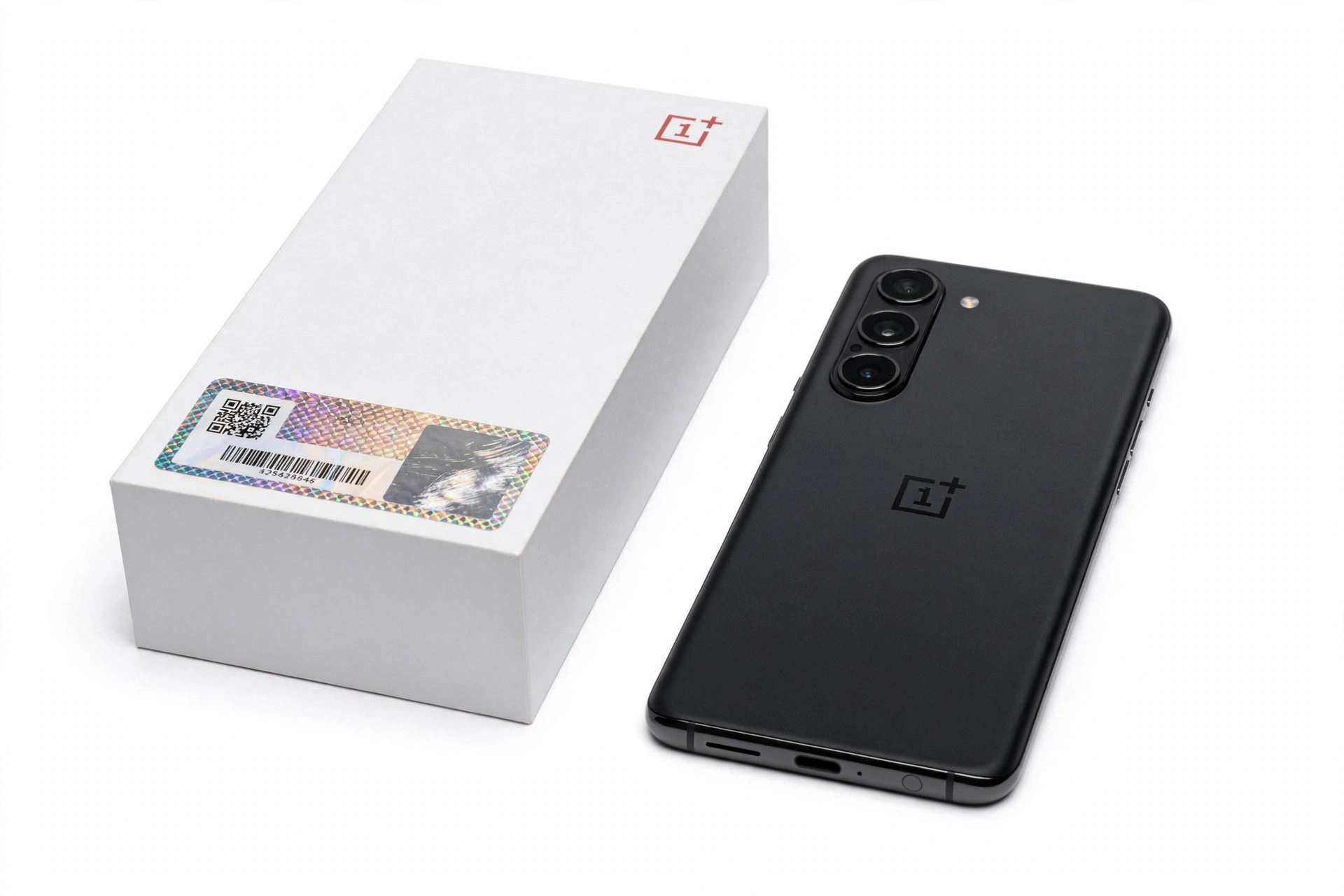
- On the box: the original retail box has a label with a barcode and the IMEI printed on it.
- On the SIM tray: eject the SIM tray and check the tiny printed text — many OnePlus models print the IMEI there.
All three must show the same number. Use the table below to interpret the result.
| Result | What it means |
|---|---|
| All three match | Consistent — continue with the remaining checks |
| Phone shows one IMEI, box shows another | Box and phone do not belong together — treat as a red flag; the phone may be refurbished, swapped, or fake |
| Phone shows an IMEI but the box/tray have none | Suspicious — genuine retail units ship with labeled packaging |
| IMEI is obviously invalid (fewer than 15 digits, all zeros) | Not a genuine factory IMEI — walk away |
Stop for safety: A copied real IMEI can pass an online lookup on a fake phone. A matching lookup result proves the number is real, not that the phone in your hand is. Never treat a single IMEI lookup as proof of authenticity — always combine it with the physical and software checks in this guide.
4. Check 2: verify the model number
Every OnePlus 13 variant carries a specific model number. Find it at Settings > About phone > Model (or on the box label), then compare it against the known variants:
- CPH2653 — global / EU variant
- CPH2655 — North America variant
- CPH2649 — India variant
- PJZ110 — China variant
A model number that does not appear in this list — or a model number belonging to a different OnePlus phone (for example, a OnePlus 12 or OnePlus 12R number on a “OnePlus 13”) — is a strong sign the phone is not what the seller claims. Note that a China-variant PJZ110 running ColorOS instead of OxygenOS is still genuine OnePlus hardware; it is a gray-market unit, not a counterfeit (see section 12 for the difference and why it matters).
Also check the model name reported by the phone: it should read “OnePlus 13.” Hardware-info apps such as AIDA64 or Device Info HW (free on the Play Store) can independently report the chipset — on a genuine unit it will read Snapdragon 8 Elite. If the app reports a MediaTek chip or an older Snapdragon, the phone is not a OnePlus 13.
5. Check 3: run the IMEI through OnePlus’s warranty check
OnePlus operates regional warranty-check portals (for example, service.oneplus.com warranty-check pages in supported regions) where you can enter an IMEI or serial number to see the device’s warranty status. A genuine OnePlus 13 will be recognized by OnePlus’s own system and show a warranty record with a start date.
What to look for:
- Device recognized with matching model: the portal should identify the device as a OnePlus 13. If it shows a different model, the IMEI was copied from another phone.
- Warranty dates: check that the warranty start date roughly matches when the seller claims the phone was first activated. A “brand new, sealed” phone with a warranty that started a year ago was activated a year ago.
- Device not found: if OnePlus’s own system has no record of the IMEI, that is a serious red flag — though it can occasionally happen with very new stock, so treat it as one failed check among several, not the sole verdict.
Tip: The serial number is a second identifier worth checking. Find it at Settings > About phone > Status (or on the box). On genuine units, the serial on the phone and the serial on the box match, just like the IMEI.
6. Check 4: the Alert Slider test
The Alert Slider is the single fastest physical tell on any modern OnePlus flagship. Slide it through its three positions — silent (top), vibrate (middle), ring (bottom). On a genuine OnePlus 13:
- Each position produces the corresponding system response immediately (the on-screen indicator changes and the ringer mode changes).
- The slider has a firm, precise mechanical feel with distinct detents.
A “OnePlus 13” with no Alert Slider, a decorative non-moving slider, or a slider that does nothing is not genuine. Counterfeit phones built on generic Android bodies almost never replicate this part — it is expensive to tool and useless to a counterfeiter, which is exactly why it is such a reliable tell.
7. Check 5: OxygenOS software signs
Genuine OnePlus 13 software is OxygenOS 15 (global variants) or ColorOS 15 (China variant), both based on Android 15. Fakes typically run a skinned generic Android that imitates the look but fails under inspection. Verify these:
- Settings depth: open Settings and browse — genuine OxygenOS has deep, consistent menus (including OnePlus-specific sections like the Alert Slider customization and gaming features). Fakes often have shallow menus with dead ends.
- System update path: go to Settings > About phone > OxygenOS version and tap to check for updates. A genuine phone contacts OnePlus’s update servers. A fake either fails silently or shows an error.
- Play Protect certification: open the Play Store > profile > Settings > About and check Play Protect certification. Genuine units are certified; many fakes are not.
- OnePlus account sign-in: try signing into a OnePlus account (or the OnePlus Store app). Genuine hardware authenticates normally.
Stop for safety: Do not sign into your Google account, banking apps, or any personal accounts on a phone you suspect is fake. A counterfeit phone can carry modified software that captures credentials. Complete all authenticity checks — and factory-reset the device — before trusting it with your accounts.
8. Check 6: hardware verification
Several OnePlus 13 hardware features are difficult or expensive for counterfeiters to fake. Test each one:
- Ultrasonic fingerprint reader: the OnePlus 13 uses an ultrasonic under-display fingerprint sensor (faster and more reliable than optical ones). Register a fingerprint and test it — then compare against what you would expect: if the sensor area behaves like a basic optical reader or fails outright, be suspicious.
- 100 W wired charging: with a genuine 100 W SUPERVOOC charger, a real OnePlus 13 charges from empty to full in roughly half an hour and shows the fast-charging animation. A fake will charge slowly regardless of the brick.
- Infrared blaster: the OnePlus 13 has an IR blaster (usable as a remote control via the IR Remote app). Check that the hardware is present.
- Camera behavior: open the camera app and look for Hasselblad branding and Hasselblad color modes. Switch through all three rear lenses — on fakes, one or more “lenses” are decorative and switching to them shows the same feed or crashes.
- Weight and feel: a genuine OnePlus 13 weighs about 213 g (glass) or 210 g (leather). A phone that feels dramatically lighter or cheaper than expected deserves a second look.
9. Check 7: packaging and box inspection
Genuine OnePlus retail packaging is high quality and consistent. Examine:
- Print quality: sharp text, correct spelling, proper OnePlus logo and red accent color. Blurry printing or spelling errors indicate a fake box — and a fake box usually means a fake phone.
- Label data: the box label should list the correct model number (CPH2653, CPH2655, CPH2649, or PJZ110), the IMEI matching the phone, and the correct color and storage configuration.
- Seals: factory seals should be intact on a “new” unit. Re-sealed boxes (double tape, mismatched seal stickers) indicate the phone was opened — it may be refurbished or used.
- Contents: check that the included charger, cable, and documentation match what OnePlus ships for the region.
10. The 10-check master worksheet
Use this worksheet as your final pass. A genuine OnePlus 13 passes every row.
| # | Check | What it proves | Limitation |
|---|---|---|---|
| 1 | IMEI cross-match (phone = box = SIM tray) | Unit integrity | Copied real IMEIs can match |
| 2 | Model number is a real OnePlus 13 variant | Correct identity | Software can be edited to lie |
| 3 | OnePlus warranty portal recognizes the IMEI | Registered with OnePlus | Very new stock may lag |
| 4 | Alert Slider works in all 3 positions | Genuine OnePlus hardware | None significant — strongest physical tell |
| 5 | OxygenOS 15 with working update path | Genuine software | Requires network access |
| 6 | Chipset reads Snapdragon 8 Elite in hardware app | Correct internals | Needs a Play Store app install |
| 7 | All three rear cameras functional with Hasselblad modes | Real camera system | Needs good lighting to test well |
| 8 | 100 W fast charging with genuine charger | Real power hardware | Needs a 100 W SUPERVOOC brick |
| 9 | Play Protect certified | Google-certified genuine build | Some gray-market units vary |
| 10 | Box quality, seals, and label data correct | Retail legitimacy | Good fakes can copy boxes |
11. Where to buy: purchase-channel risk table
Where you buy matters as much as what you check. Use this table to calibrate your caution.
| Channel | Risk level | Notes |
|---|---|---|
| OnePlus official store / authorized retailers | Lowest | Full warranty, sealed retail unit |
| Major carriers and big-box electronics stores | Low | Genuine stock; verify the exact variant |
| Established online marketplaces (sold by reputable sellers) | Medium | Run all 10 checks on arrival; keep return rights |
| Peer-to-peer marketplaces, classified ads | High | Meet in person, run checks before paying, never pay in advance |
| Unknown websites with prices far below market | Highest | Classic counterfeit channel — a OnePlus 13 at half price is not a OnePlus 13 |
12. Counterfeit vs. refurbished vs. gray-market: know the difference
Not every “not as described” OnePlus 13 is a counterfeit. The three categories below need different responses.
| Category | What it is | What to do |
|---|---|---|
| Counterfeit | Not made by OnePlus; imitates the branding | Do not use with personal accounts; report the seller; seek a refund |
| Refurbished sold as new | Genuine OnePlus hardware, previously used and restored | Decide if the price was fair for refurbished; check warranty status; a refurbished phone at a new-phone price is a bad deal |
| Gray-market (e.g., China PJZ110 sold abroad) | Genuine OnePlus hardware meant for another region | May lack local warranty and some network bands; usable if the price reflects that — but confirm LTE/5G bands work with your carrier |
For more on verifying OnePlus phones generally, see our general OnePlus authenticity guide. Similar model-specific guides exist for the Samsung Galaxy S25 Ultra and the Google Pixel 10 Pro.
13. What to do if your OnePlus 13 is fake
- Do not sign into personal accounts on the device. Factory-reset it before handling it further.
- Document everything: photos of the phone, box, labels, the listing, and your messages with the seller.
- Request a refund through the platform’s buyer protection immediately — most platforms have time limits.
- Report the seller to the marketplace and, for large-scale counterfeiting, to local consumer protection authorities.
- Do not resell it as genuine — passing a known fake to another buyer creates legal liability.
- Never pay a “verification fee” to anyone claiming they can remotely authenticate the phone — that is a follow-up scam.
14. What these checks can and cannot establish
| The checks can establish | The checks cannot establish |
|---|---|
| Whether the hardware matches a real OnePlus 13 | Whether the phone was stolen (check with your carrier/police for that) |
| Whether the IMEI is registered with OnePlus | Whether the seller owned it legitimately |
| Whether the unit is new, refurbished, or used | The exact history of repairs it may have had |
| Whether the region variant suits your carrier | Future software support beyond OnePlus’s stated policy |
15. Hypothetical examples
(The following are hypothetical illustrations, not customer stories.)
Example 1 — Maya’s marketplace “deal.” Maya finds a OnePlus 13 listed at 40% below retail on a peer-to-peer marketplace. On inspection, the phone has no Alert Slider — just a smooth edge where it should be. The hardware-info app reports a MediaTek chip. Maya walks away. The missing Alert Slider alone proved it was not a OnePlus 13.
Example 2 — Daniel’s gray-market surprise. Daniel buys a sealed OnePlus 13 from an importer. All hardware checks pass — Alert Slider works, cameras are real, IMEI cross-match is clean — but the model number is PJZ110 and the software is ColorOS, not OxygenOS. It is genuine OnePlus hardware meant for China. Daniel keeps it after confirming his carrier’s bands work, but he knows the local warranty does not apply.
16. Frequently asked questions
Can I check if a OnePlus 13 is original using just the IMEI?
An IMEI lookup is a useful starting point but not proof on its own, because counterfeiters copy real IMEI numbers onto fake phones. Always combine the lookup with the physical checks in this guide — especially the Alert Slider test and the model-number verification.
What is the model number of the global OnePlus 13?
The global/EU variant is CPH2653, North America is CPH2655, India is CPH2649, and China is PJZ110. If the phone reports a different model number, it is not the variant the seller claims — or not a OnePlus 13 at all.
Does the OnePlus 13 have an Alert Slider?
Yes. The three-position Alert Slider (silent / vibrate / ring) on the left edge is a signature OnePlus feature and one of the strongest authenticity tells. A “OnePlus 13” without a working Alert Slider is not genuine.
How do I check the warranty on a OnePlus 13?
Enter the IMEI or serial number on OnePlus’s regional warranty-check portal (service.oneplus.com in supported regions). A genuine device will show a warranty record with a start date you can compare against the seller’s story.
Is a China-version (PJZ110) OnePlus 13 fake?
No — it is genuine OnePlus hardware intended for the Chinese market, running ColorOS instead of OxygenOS. It is gray-market when sold abroad: real phone, but typically without local warranty and possibly missing some carrier bands. Verify band compatibility with your carrier before buying.
What should I do if I already bought a fake OnePlus 13?
Do not sign into personal accounts on it. Document the phone, box, and listing; request a refund through the platform’s buyer protection; report the seller; and never resell it as genuine.
Can a refurbished OnePlus 13 pass these checks?
Yes — a properly refurbished genuine OnePlus 13 is real OnePlus hardware and will pass the authenticity checks. The issue is only when it is sold as new. Check the warranty start date and inspect for signs of prior use to tell the difference.
Where can I get a second opinion in person?
If the checks leave you uncertain, a reputable local repair shop can inspect the hardware. In the Las Vegas area, Las Vegas Phone Repair & Accessories (7400 Las Vegas Blvd S, Unit TT42, Las Vegas, NV 89123; (424) 406-6202; open 10 AM–8 PM, call ahead to confirm today’s hours) can examine the device and give you an assessment — though note that a shop inspection is an opinion, not a manufacturer certification.
Video: How to tell if your smartphone is fake or real
Sources and editorial notes
- Android Police — OnePlus 13 announcement and specifications (launch specs: Snapdragon 8 Elite, 6.82-inch display, 6,000 mAh battery, IP69)
- GSMArena — OnePlus 13 full specifications (model variants, dimensions, network bands)
- The Tech Outlook — OnePlus 13 global model CPH2653 certification (model number confirmation)
- oneplus_archive — OnePlus 13 model ID reference (CPH2653/CPH2655/CPH2649/PJZ110 regional mapping)
- The Tech Outlook — smartphone warranty check via IMEI (OnePlus service.oneplus.com warranty-check portal reference)
- Technastic — checking phone authenticity and warranty status (IMEI methods, hardware-info app verification approach)
- Dr.Fone — OnePlus IMEI check methods (*#06#, Settings paths, SIM tray and packaging locations)
Last source check: October 14, 2026. AI-assisted editorial guide, checked against the linked manufacturer information and launch reporting. Specifications are reported from launch coverage and may vary by region; regional model numbers were cross-checked across multiple certification listings. This guide describes inspection steps only and does not bypass any device security.
Let’s get you connected again.
Tell us what’s happening with your device and we’ll help you decide the safest next step — no jargon, no pressure.
Las Vegas Phone Repair & Accessories · 7400 Las Vegas Blvd S, Unit TT42, Las Vegas, NV 89123
10:00 AM–8:00 PM — call ahead to confirm today’s hours
1 thought on “How to Check If OnePlus 13 Is Original: Authenticity Guide”